安装前准备工作
- 建议使用企业版镜像(非LTSC长期支持版),可以在massgrave网站下载最新business版的ISO文件(下载地址:https://massgrave.dev/windows_11_links)
- 最好使用rufus建立启动盘而不是在PE还原镜像(否则会遇到recovery分区缺失等问题),并且Rufus可以直接阻止bitlocker和跳过oobe设置
- 在OOBE阶段使用shift+f10调出cmd然后通过diskpart命令clean掉整块系统盘,并且使用convert gpt命令。
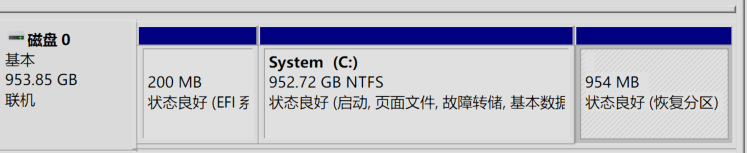
- 如果使用diskpart命令全新安装,应会在安装盘自动生成一个200MB的efi分区、一个16MB的msr分区、系统分区和一个954MB的recovery分区
安装阶段跳过联网账户/启用本地账户 + 防止bitlocker
shift+f10调出cmd,输入regedit打开注册表,找到:计算机\HKEY_LOCAL_MACHINE\SOFTWARE\Microsoft\Windows\CurrentVersion\OOBE,新建Dword项HideWirelessSetupInOOBE,值给1
注册表找到:计算机\HKEY_LOCAL_MACHINE\SYSTEM\CurrentControlSet\Control\BitLocker
,新建或修改已有的Dword值:PreventDeviceEncryption为1
这一步可以在Rufus中做安装u盘的时候代替
本文以下所有操作均为进入系统后操作,建议操作前确保update和微软商店均已没有新更新
卸载edge和小组件/阻止gamebar后台录制
- 卸载edge浏览器
务必提前装好其他浏览器再操作!!!
首先尝试用“windows11轻松设置”这个软件卸载
(下载地址:https://oyksoft.lanzouu.com/b009i45tzc 密码:95ag)
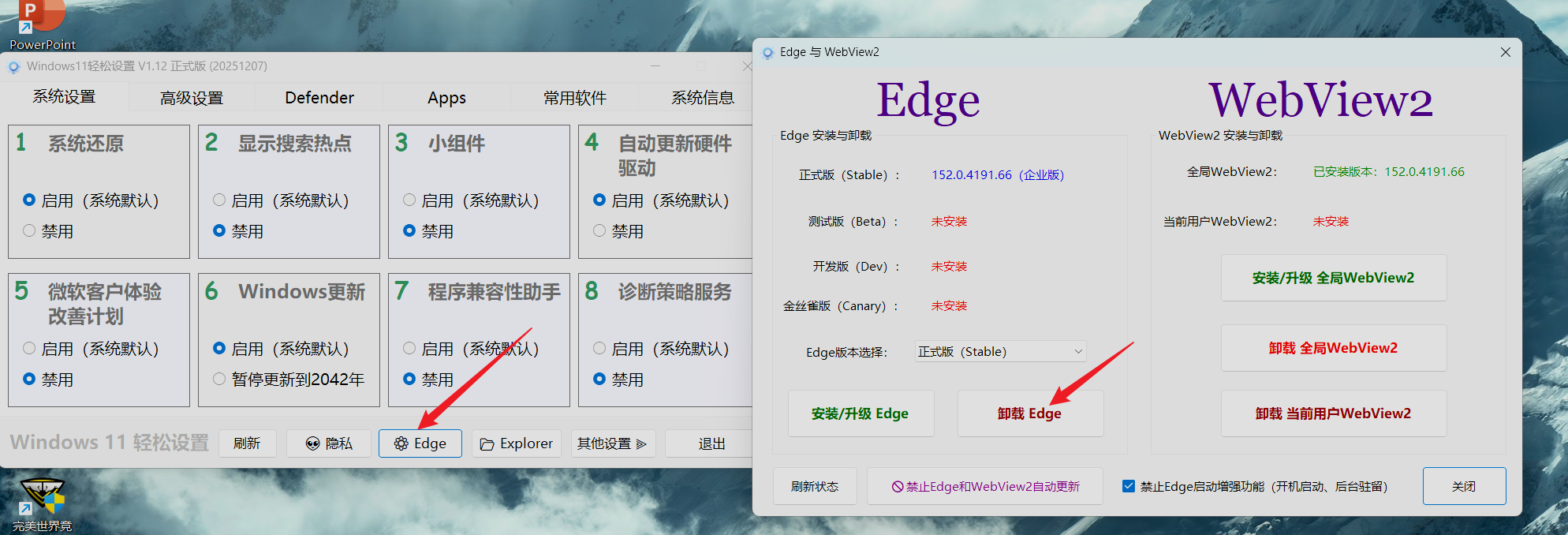
如不成功再尝试:edge浏览器卸载方案,随后可去控制面板正常卸载edge。
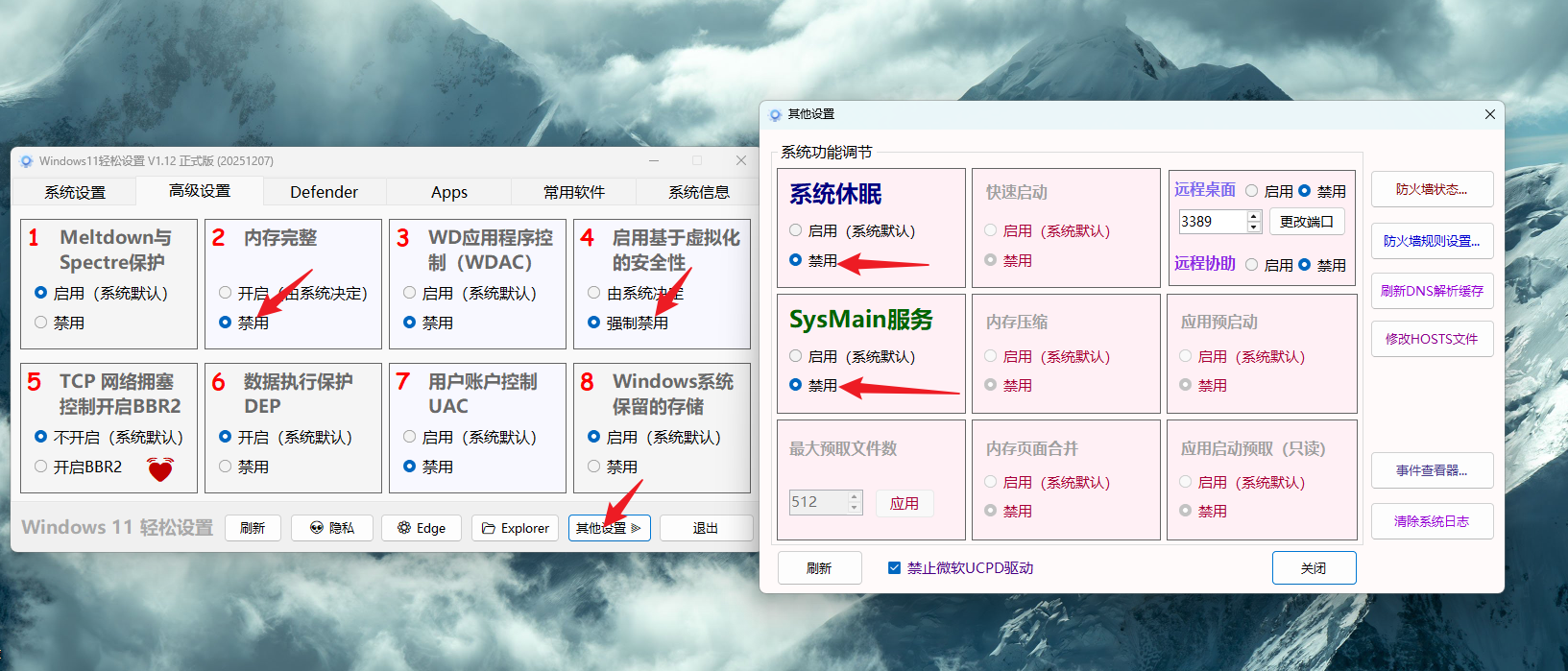
另外可以通过这个软件关闭vbs和休眠、sysmain(如有机械硬盘则需要尽量开启sysmain)等功能
-
卸载小组件
管理员模式启动cmd,输入:winget uninstall "windows web experience pack"win+r运行gpedit.msc,找到计算机配置 -> 管理模板 -> windows组件 -> 小组件,找到“允许小组件”,选择已禁用
-
关闭GameDVR后台录制
管理员模式启动cmd,输入:reg add "HKCU\System\GameConfigStore" /v "GameDVR_Enabled" /t REG_DWORD /d "0" /f reg add "HKLM\SOFTWARE\Policies\Microsoft\Windows\GameDVR" /v "AllowGameDVR" /t REG_DWORD /d "0" /f reg add "HKCU\SOFTWARE\Microsoft\Windows\CurrentVersion\GameDVR" /v "AppCaptureEnabled" /t REG_DWORD /d "0" /f注:这里关闭GAMEDVR的3条注册表,可用dism++的“关闭游戏录制”功能代替
安全卸载预装软件及商店版UWP应用
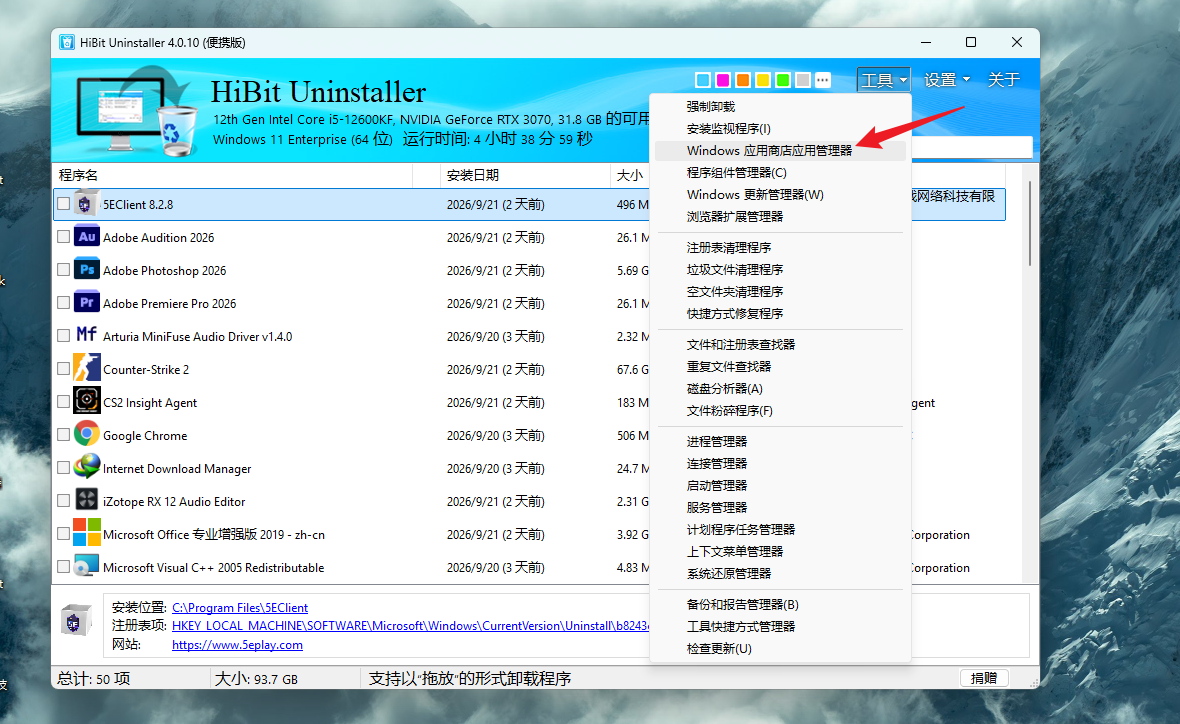
使用hibituninstaller(下载地址:https://www.hibitsoft.ir/Uninstaller.html)
即可轻松卸载一众预装应用,包括商店应用
关闭vbs(基于虚拟化的安全性)
在windows安全中心 -> 设备安全性 -> 内核隔离详细信息 -> 关闭内存完整性
win+r,运行输入regedit,导航至:计算机\HKEY_LOCAL_MACHINE\SYSTEM\CurrentControlSet\Control\DeviceGuard,将EnableVirtualizationBasedSecurity项的值改为0
部分国外游戏平台会要求VBS开启,如faceit,但会自动开;大部分国内游戏平台会要求VBS保持关闭,但需手动关;如果平时遇到了需要频繁开关VBS的情况,可以采用下面推荐的软件进行切换
关闭vbs及内存完整性,可用“windows11轻松设置”这个软件代替注册表操作,开关设置请见上edge卸载篇幅
隐私与遥测深度优化
-
组策略配置
Win+R 输入 gpedit.msc,依次进入:
①计算机配置 → 管理模板 → Windows 组件 → 数据收集和预览版本 → 「允许诊断数据」
选择「已启用」,选项设为发送所需的诊断数据(企业版可直接选「诊断数据关闭」)
②计算机配置 → 管理模板 → Windows 组件 → Windows 错误报告 → 「禁用 Windows 错误报告」,选择「已启用」
③计算机配置 → 管理模板 → Windows 组件 → Windows更新 → 管理最终用户体验 → 配置自动更新,选择「已启用」,并勾选「2-通知下载和自动安装」,这一步会让你的windows系统仅检查更新而不自动下载(也不会静默自动安装) -
系统设置调整
打开「设置 → 隐私和安全性 → 诊断和反馈」:
反馈频率改为「从不」
关闭「改进墨迹书写和键入」、「位置」等所有可选上报开关
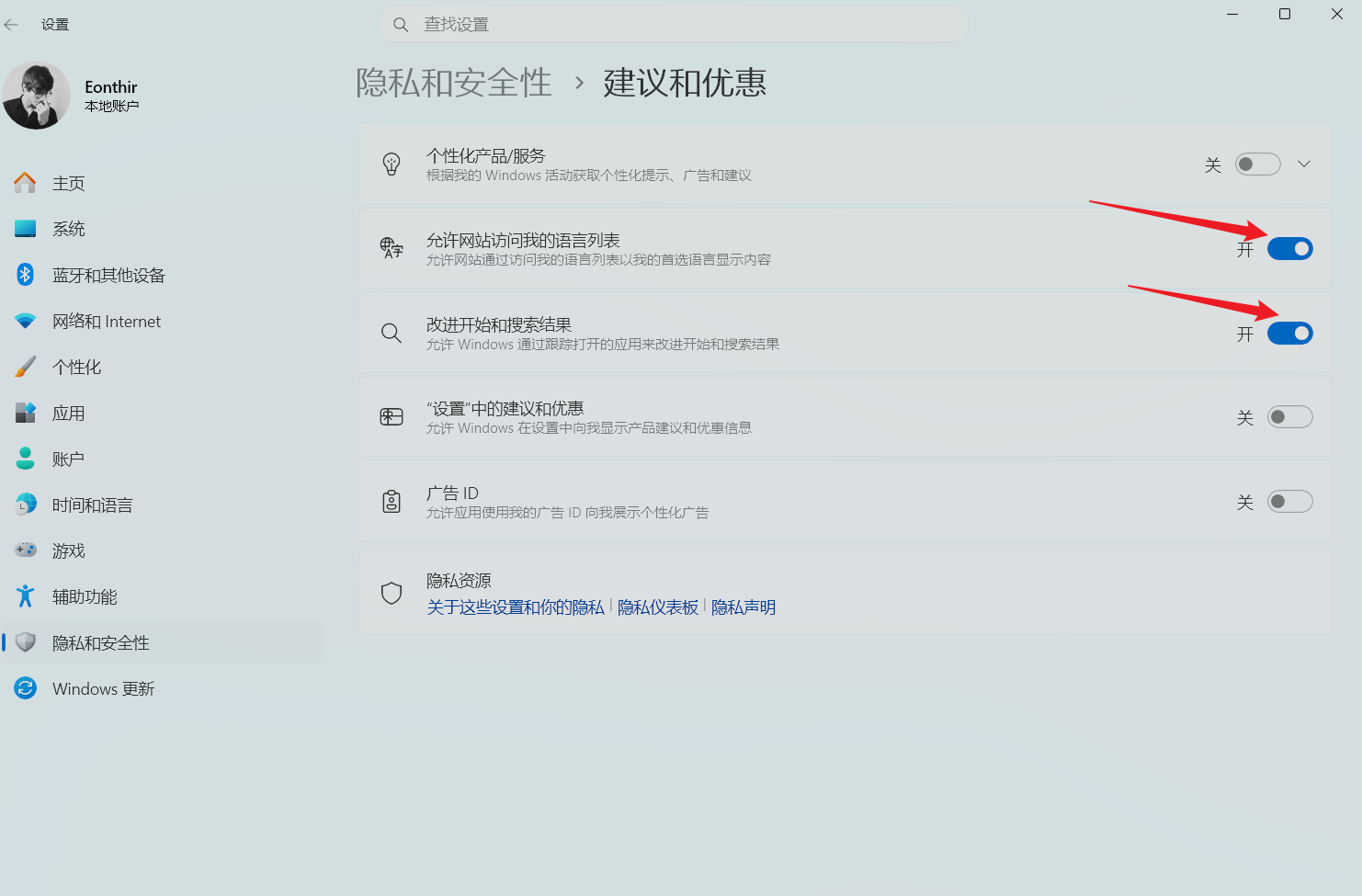
注:建议和优惠中,建议保留开启“允许网站访问我的语言列表”、“改进开始和搜索结果两项”
-
利用pstools禁用相任务计划
下载pstools,下载地址:https://download.sysinternals.com/files/PSTools.zip
解压后管理员运行cmd,并cd进这个目录,运行PsExec.exe -i -s %windir%\system32\mmc.exe /s taskschd.msc禁用Application Experience、Customer Experience Improvement Program、Diagnostics、Windows Error Reporting四个文件夹中的全部任务(期间遇到报错重新运行上面的命令打开任务计划程序即可)
系统服务精简
以下列出的服务都可以安全禁用
| 服务显示名 | 服务名 | 备注 |
|---|---|---|
| Connected User Experiences and Telemetry | DiagTrack | 系统遥测核心服务 |
| Diagnostic Policy Service | DPS | 系统诊断与问题检测 |
| DialogBlockingService | DialogBlockingService | 对话框阻止服务 |
| Distributed Link Tracking Client | TrkWks | NTFS 文件跨设备链接维护 |
| Downloaded Maps Manager | MapsBroker | 离线地图数据管理 |
| Geolocation Service | lfsvc | 系统定位与地理围栏 |
| Microsoft App-V Client | AppVClient | 应用虚拟化客户端 |
| Microsoft 键盘筛选器 | MsKeyboardFilter | 击键筛选与映射 |
| Net.Tcp Port Sharing Service | NetTcpPortSharing | TCP 端口共享服务 |
| Network Connected Devices Auto-Setup | NcdAutoSetup | 网络设备自动发现安装 |
| Offline Files | CscService | 脱机文件缓存 |
| OpenSSH Authentication Agent | ssh-agent | SSH 密钥代理 |
| Program Compatibility Assistant Service | PcaSvc | 程序兼容助手 |
| Remote Registry | RemoteRegistry | 远程修改注册表 |
| Routing and Remote Access | RemoteAccess | 路由与远程访问 |
| Shared PC Account Manager | SharedPCAccountManagerService | 共享设备账户管理 |
| SysMain | SysMain | 系统预读缓存(SSD 下无收益) |
| TCP/IP NetBIOS Helper | lmhosts | 无局域网共享可禁用 |
| User Experience Virtualization Service | UevAgentService | 用户体验虚拟化 |
| Windows Error Reporting Service | WerSvc | 错误报告上传 |
| 零售演示服务 | RetailDemoService | 门店演示模式 |
| 设备管理 WAP 推送消息路由服务 | dmwappushservice | 移动设备管理推送 |
| 自动时区更新程序 | tzautoupdate | 自动同步系统时区 |
注册表相关优化
LUA开关:
HKLM\SOFTWARE\Microsoft\Windows\CurrentVersion\Policies\System
隐藏图库
HKEY_CURRENT_USER\Software\Classes\CLSID{e88865ea-0e1c-4e20-9aa6-edcd0212c87c}
"System.IsPinnedToNameSpaceTree"=dword:00000000
隐藏主文件夹(需pstools权限)
HKEY_CLASSES_ROOT\CLSID{f874310e-b6b7-47dc-bc84-b9e6b38f5903}
System.IsPinnedToNameSpaceTree